Stock Reconciliation
Stock Recon
Background Information and Definition of Terms
Stock taking allows the shop owner to verify that the system shop inventory tallies with the inventory on the shop
Opening Balance
Opening Stock is the amount and value of materials that a company has available for sale or use at the beginning of an accounting period.
Closing Balance
The closing Stock of the previous accounting period becomes the opening Stock of the current accounting period.
System Workflow

Stock take types:
- Periodic (daily, weekly, monthly)
- Snapcheck
1. Periodic Stock Take (daily, weekly, monthly)
Stock take periods are selected from shop settings. These can be:
- Daily
- Weekly
- Monthly
A system cron job runs on a daily to fetch the list of shops whose stock take duration has reached i.e :
- Shops with daily stock take
- Shops with weekly stock take that on the the 7th day of the week
- Shops with monthly stock take that on the final day of the month
2. Snap check Stock Take
This can be done at any time of the day and does not require a cronjob to have taken place
Once a user submits the stock take values, a new record is created on the stock take table and the table updated the using the same process followed using the cron job above.
The counted_quantity value however is also entered upon creation.
Database Design
A db table is created with the following columns
id, inventory_id, product_id, expected_quantity, closing_quantity, counted_quantity, shop_id, stock_take_date, period_start_date, period_end_date, reconciliation_date
classDiagram
  Product <|-- StockTake
  Shop <|-- StockTake
  class Shop{
    +int id
    +String Shop Name
  }
  class Product{
    +int id
    +String Product Name
  }

  class StockTake{
    +int id
    +int inventory_id
    +int product_id
    +Float expected_quantity
    +Float closing_quantity
    +Float counted_quantity
    +int shop_id
    +DateTime stock_take_date
    +DateTime period_start_date
    +DateTime period_end_date
    +DateTime reconciliation_date
}expected_quantity = previous_opening_stock + purchases + (all positive adjustments) + (all negative adjustments - (sum of all inventories sold in all sales)
closing_quantity = system inventory value at the time of the cron job
counted_quantity - this value is null when the cron job runs
stock_take_date - date when the stock take was done (this is sent from the client ) Default = null
period_start_date - start of period when the stock take is supposed to happen. ie: for monthly, start date could be 01/March/2023
period_start_date - end period when the stock take is supposed to happen. ie: for monthly, start date could be 30/March/2023
reconciliation_date - date when the stock take record was set to status approved
status = draft, sent, approved
Once the cron job runs the table should look like this
| id | counted_quantity | reconciliation_date | stock_take_date | inventory_id | product_id | expected_quantity | closing_quantity | shop_id | period_start_date | period_end_date |
|---|---|---|---|---|---|---|---|---|---|---|
| 1 | null | null | null | 2 | OMO | 10 | 10 | 1 | 01/March/2023 | 30/March/2023 |
| 2 | null | null | null | 3 | Dap | 12 | 12 | 1 | 01/March/2023 | 30/March/2023 |
Once the stock take record is approved, the Ui expects to send the following payload:
{
    "duration": "weekly/daily/monthly",
    "start_date": "01/March/2023",
    "end_date": "31/March/2023",
    "stock_take_date": "31/March/2023",
    "inventories": [
        {
            "inventory_id": 2,
            "quantity": 10
        },
        {
            "inventory_id": 3,
            "quantity": 4
        }
    ]
}
This will update the table records created by the cronjob based on start date and end date
The following values will be modified
counted_quantity, stock_take_date, reconciliation_date will be set tot the values sent on the request. Note that this value was initially set to null
| id | counted_quantity | reconciliation_date | stock_take_date | inventory_id | product_id | expected_quantity | closing_quantity | shop_id | period_start_date | period_end_date |
|---|---|---|---|---|---|---|---|---|---|---|
| 1 | 10 | 01/April/2023 | 01/April/2023 | 2 | OMO | 10 | 10 | 1 | 01/March/2023 | 30/March/2023 |
| 2 | 10 | 01/April/2023 | 01/April/2023 | 3 | Dap | 12 | 12 | 1 | 01/March/2023 | 30/March/2023 |
The user will then send a request with status approved to complete this stock take process.
How stock is updated
Once a stock take record is set to approved, inventory values are updated to reflect the counted_quantity specified.
Inventory transactions are also created to indicate the changes made through the stock take.
Alternative scenarios
-
Alternative scenario 1:
-
When a cron job fails
When a cron job fails, the stock take record will only be created once the cron job runs again or the user sends stock take values
If the cronjob runs before the user sends stock take values, the
closing_quantityis set to null but all other values are updated accordingly
-
-
User does not approve stock take value due to dispute
- Inventory values remain as is
Clarifications:
Why does the closing_quantity remain as null when it could be calculated from the inventory transactions? - Inventory transactions may not always show correct inventory values.
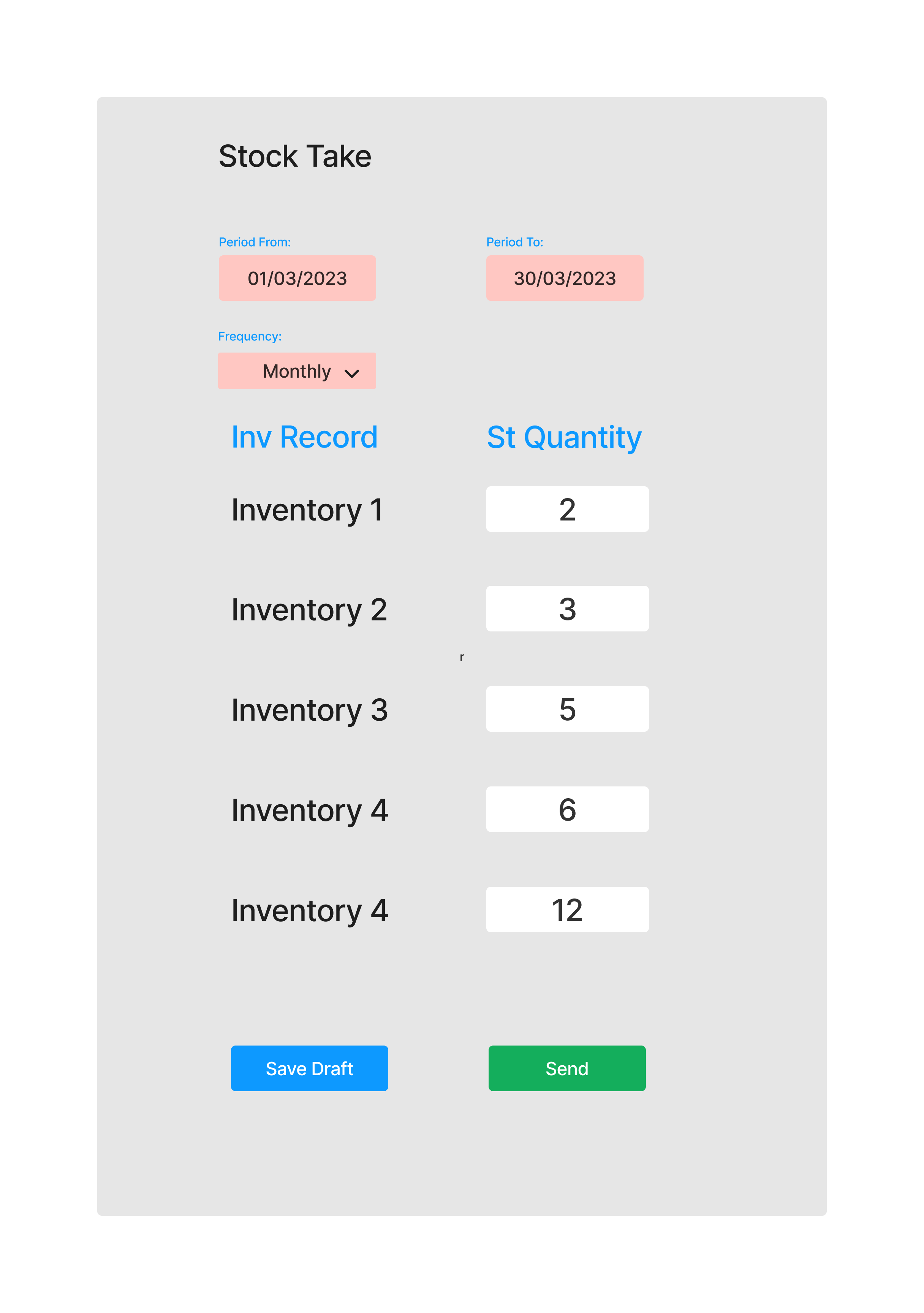
UI Process:
Select period for the stock take
- Start date
- End date
- Frequency (daily, weekly, monthly)
View list of inventories on the shop
Count inventory value on the shop and input the values on the system
Save the values as draft until stock take is complete
Once stock take is complete, the user then clicks on send stock take
Below is a sketch of the interface: